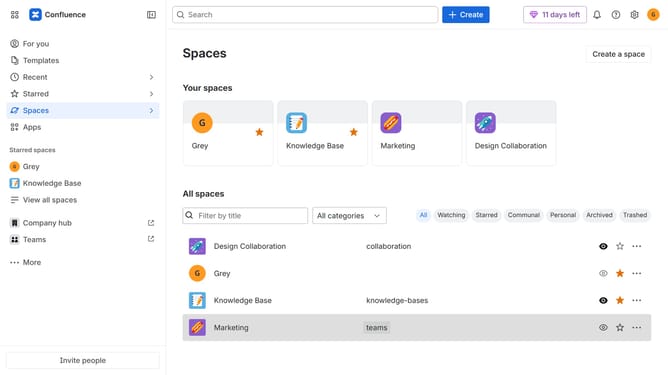
How to view watched spaces in Confluence
Here is how to view watched spaces in confluence
- First, click on "Spaces" in the left sidebar
- Next, select "View all spaces" in the dropdown menu
- Then, locate the filter options at the top of the spaces list
- Finally, click on the "Watching" option to filter the spaces
Why should you view watched spaces in Confluence
Confluence is a dynamic collaboration tool that enhances teamwork by organizing and sharing knowledge seamlessly.
Viewing watched spaces in Confluence offers a streamlined way to keep track of changes and updates within specific projects or areas of interest. This feature ensures you stay informed without the clutter of unnecessary notifications.
By effectively managing watched spaces, team members can focus on the most relevant information, enhancing productivity and ensuring timely responses. This fosters a more connected and efficient work environment.
Last update