How to view only sent campaigns in Constant Contact
Here is how to view only sent campaigns in constant contact
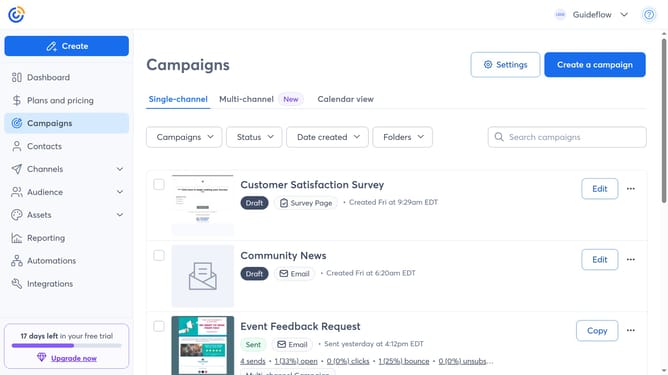
- First click on the "Campaigns" in the left sidebar menu
- Next click on the "Status" dropdown filter in the top filter bar
- Then select "Sent" option from the Status dropdown menu
- The campaigns list will now display only the sent campaigns
Why should you view only sent campaigns in Constant Contact
Constant Contact is a dynamic tool designed to streamline your email marketing efforts with precision and ease.
The ability to view only sent campaigns in Constant Contact is a powerhouse feature that enhances your marketing strategy by simplifying campaign management.
By focusing solely on sent campaigns, users can efficiently analyze past tactics, assess reach and engagement, and draw meaningful insights to inform future strategies.
This feature elevates your email marketing engine, enabling a clearer understanding of your campaign’s impact and success.
Last update