How to view communal spaces in Confluence
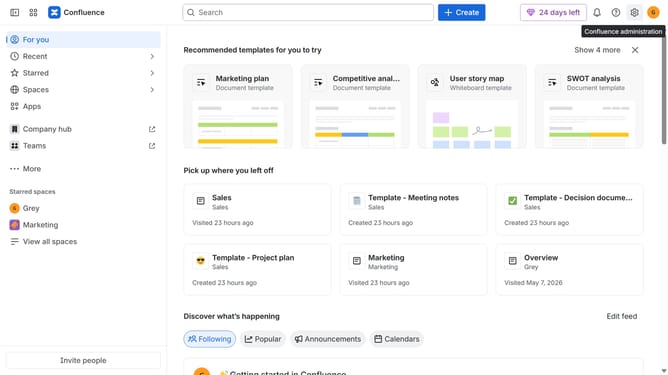
Here is how to view communal spaces in confluence
- First, click on "Spaces" in the left sidebar
- Next, select "View all spaces" in the dropdown menu
- Then, locate the filter options at the top of the spaces list
- Finally, click on the "Communal" option to filter the spaces
Why should you view communal spaces in Confluence
Confluence is a powerful collaboration tool that fosters seamless teamwork and knowledge sharing.
Viewing communal spaces in Confluence allows team members to easily access shared resources and contribute to collective projects.
This feature enhances transparency and efficiency, ensuring that everyone stays informed and engaged.
By utilizing communal spaces, teams can strengthen communication, drive innovation, and achieve goals more effectively.
Last update