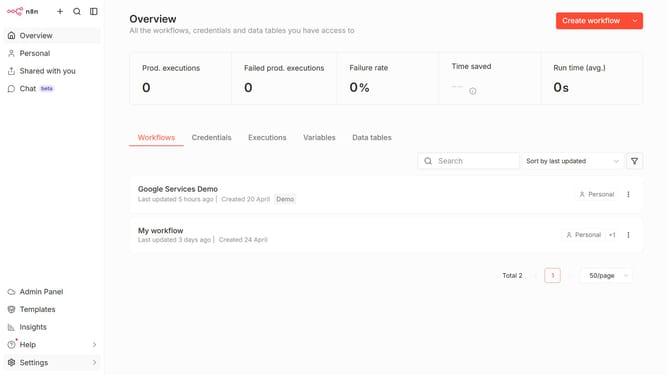
How to create Microsoft 365 Agent API credential in n8n
Here is how to create microsoft 365 agent api credential in n8n
- First click on the dropdown arrow next to "Create workflow" button.
- Then click on "Create credential" option.
- First click on the "Search for app..." input field.
- Then type "microsoft 365" into the search input and click on "Microsoft 365 Agent API".
- Then click on the "Continue" button.
- Then fill in the required credential details
- Finally click on the "Save" button.
Why should you create Microsoft 365 Agent API credential in n8n
n8n is a powerful workflow automation tool that empowers users to seamlessly connect various applications and streamline processes.
Creating a Microsoft 365 Agent API credential in n8n allows for secure communication with Microsoft's suite of services, enhancing workflow automation and data integration.
This feature is particularly beneficial for organizations that rely on Microsoft 365, as it facilitates the automatic synchronization of data and processes across their platforms.
By leveraging these credentials, users can improve operational efficiency and reduce manual task handling, ensuring smooth and reliable workflows.
Last update