How to show or hide completed checklist items in ClickUp
Here is how to show or hide completed checklist items in clickup
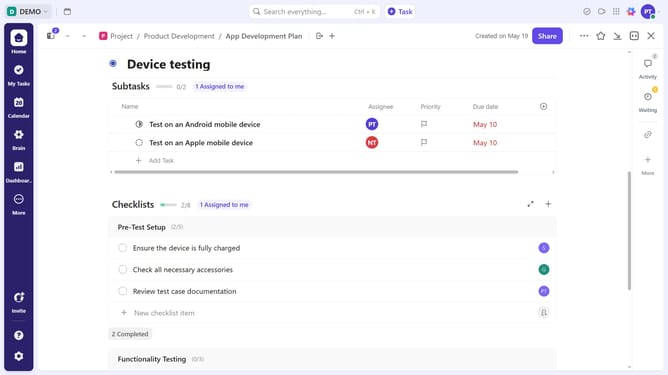
- First in the task list, find and click on the task containing the checklist
- Then in the task details view, scroll down to the "Checklists" section
- Next click on the "More options" (three dots) next to the checklist
- Then on "Show completed items" or "Hide Completed items" option in the dropdown menu
Why should you show or hide completed checklist items in ClickUp
ClickUp is an all-in-one productivity platform designed to streamline work management for individuals and teams.
A key feature of ClickUp is its ability to show or hide completed checklist items, offering flexibility in how you view tasks and progress. This feature allows you to focus on what’s important by keeping the interface clean once tasks are accomplished.
Utilizing this feature can enhance your workflow efficiency by reducing visual clutter, making it easier to prioritize ongoing tasks. It promotes a sense of accomplishment by providing a clear picture of your completed and outstanding tasks.
Last update