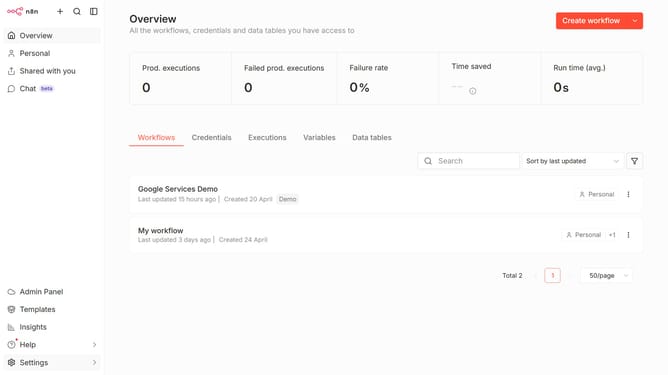
How to create Google Ads OAuth2 API credential in n8n
Here is how to create google ads oauth2 api credential in n8n
- First click on the dropdown arrow next to "Create workflow" button.
- Then click on "Create credential" option.
- Next click on the "Search for app" input field and enter "google ads".
- Then select "Google Ads" from the search results.
- After that, click on the "Continue" button.
- Then fill in the necessary input fields.
- Finally, click on the "Sign in with Google" button.
Why should you create Google Ads OAuth2 API credential in n8n
n8n is a powerful automation tool designed to streamline workflows and integrate diverse applications seamlessly.
Creating Google Ads OAuth2 API credentials in n8n empowers users to securely connect their automation workflows with Google Ads, facilitating smooth data transfer and efficient marketing operations.
This feature ensures meticulous data management and enhances marketing strategy alignment by providing real-time access to Google Ads data directly from n8n workflows.
Harnessing this capability in n8n not only optimizes your advertising efforts but also elevates overall operational efficiency, making it an indispensable tool for any digital marketing endeavor.
Last update