Linkedin
LinkedIn is a professional networking platform that helps individuals and businesses connect, share opportunities, and grow careers. It offers tools for recruiting, marketing, sales, and learning, with over 1 billion members worldwide, including executives from every Fortune 500 company.
Website
Industry
Leadgen
Share this article:

How to find your LinkedIn URL

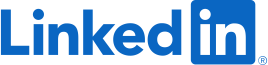
Here is how to find your linkedin url

  1. First click on the profile icon labeled "Me" in the top navigation bar
  2. Then click on the "View Profile" option in the dropdown menu
  3. Next click on the "Contact info" link under the location information
  4. Finally copy the URL to share or use it as needed

Create your own interactive guide with Guideflow

Why should you find your LinkedIn URL

LinkedIn serves as a professional networking hub that connects individuals and businesses worldwide.

Finding your LinkedIn URL is a straightforward feature that enhances how others can easily reach your online professional profile.

Using your LinkedIn URL in resumes, email signatures, or personal websites allows potential employers and partners to access a snapshot of your career journey effortlessly.

Ultimately, accessing your LinkedIn URL ensures a seamless way to promote visibility and open doors for new professional opportunities.

Last update
July 14, 2026
Cursor MariaA cursor points to a button labeled "James."

Loo oma esimene demo vähem kui 30 sekundiga.